AZ Screen Recorder

 Category Category | Apps |
 Size Size | 85.62 MB |
 Requirements Requirements | Android 5 and up |
 Downloads Downloads | 10,000,000+ |
 Package Name Package Name | com.hecorat.screenrecorder.free |
 Content Rating Content Rating | 3 |
AZ Screen Recorder App Download Overview
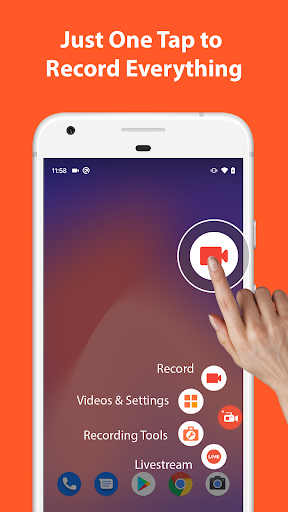
Introducing the AZ Screen Recorder, a top-rated screen recording app featured on Google Play Home Page, Android Police, Yahoo News, CNET, Android Central, and more. This user-friendly app allows you to effortlessly record your Lollipop screen without any time limits, watermarks, or intrusive advertisements. Designed with a simple and elegant user interface, AZ Screen Recorder makes creating high-quality screencast videos a breeze. It’s versatile, enabling you to pause and resume during recording, record audio from your mic, and even snap at the exact moment on any screen thanks to its floating window feature.
AZ Screen Recorder Mobile App Download Features
- Easy One-Action Recording: Start and stop recording with just a single action.
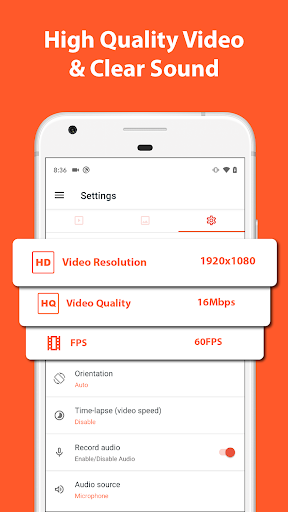
- HD and FullHD Videos: Record high-quality HD and FullHD video screencasts.
- Pause and Resume: The only screencast app in the Android market that lets you pause and resume while recording.
- Audio Recording: Record audio from your mic and automatically mix it into your screencast videos.
- Screen Touches: Enable screen touches in the settings so viewers can see exactly what you’re doing.
- Customize Your Screencasts: Set video resolution, bit-rate, screen orientation, timer to stop, saving directory selection and more.
- Share, View or Delete: Easily view, share, or delete your recorded videos.
AZ Screen Recorder App – What’s New
The latest version of AZ Screen Recorder introduces some super cool and unique features unseen in other screen recorders. A magic button lets you control your recording without displaying anything on the screen, ensuring your viewer’s focus stays on your content. With the new overlay front camera, you can record your face and reactions in a movable and resizable window. This update also introduces a countdown timer, the ability to draw on screen, trim videos, and even live-stream your screen to different social networks.
AZ Screen Recorder Mobile App Description
AZ Screen Recorder is the go-to app for creating professional screencast videos on your Lollipop. It sets itself apart from the rest with its convenience, quality, and array of features. Not only can you record your screen in HD and FullHD, but you can also pause and resume while recording. It offers the option to record audio from your mic, adjust screen touches visibility, customize your recording settings, and much more. With AZ Screen Recorder, creating tutorials, promotional videos, game commentary, or video chats has never been easier. Whether you’re a seasoned pro or a startup, AZ Screen Recorder is built to make everyone satisfied. Download now and experience the ultimate screen recording solution today!


Screenshots