Google Docs

 Category Category | Apps |
 Size Size | 97.91 MB |
 Requirements Requirements | Android 4.4 and up |
 Downloads Downloads | 380,000,000+ |
 Package Name Package Name | com.google.android.apps.docs.editors.docs |
 Content Rating Content Rating | 3 |
Google Docs App Download Overview
Google Docs is a dynamic, cloud-based word processor developed by Google Inc. as part of its Google Drive service. With Google Docs, you can write, edit, and create impactful documents. The app allows for real-time collaboration, tracks revision history, and saves changes automatically on Google’s servers. Ideal for team collaborations, the app is accessible for use via Google Chrome, Apple Safari web browsers, and as a mobile app available on both iOS and Android operating systems.
Google Docs Mobile App Download Features
- Real-time collaboration: Google Docs allows multiple users to open, edit, and share the same document simultaneously. Each user is distinguished by color, making it easy to track additions and changes.
- Explore Function: Launched in September 2016, this feature enables users to search results based on the information in the document.
- Suggested Edits: Similar to “commenting access,” this feature allows users to accept or reject editing suggestions made by other participants.
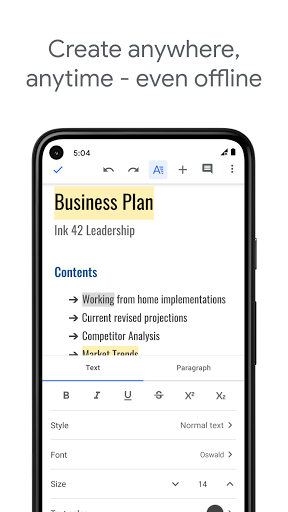
- Offline Accessibility: Users can view and edit documents offline if they are using the Google Chrome web browser.
- File Compatibility: Google Docs supports multiple formats including .doc, .docx, .dot, .html, .rtf, and more. It allows users to edit up to 1.02 million characters regardless of the font size. Files up to 50 MB can be converted to .gdoc Docs format.
Google Docs App – What’s New
Google has recently added new Table of Contents (ToC) customization tools to Google Docs. With this update, users will soon have a new default ToC style to choose from. The update enables greater control over tab leaders, page numbers, and the indentation level of each section. Google has also improved the customizability of tables in general, with new sidebar options for in-document alignment of the table itself and display options for the cells within.
Google Docs Mobile App Description
Google Docs is an innovative word processor designed for creating, editing, and managing documents. Developed by Google Inc., it is accessible via web browsers, iOS, and Android systems, making it a versatile tool for users on various platforms. The app’s real-time collaboration feature allows multiple users to work on the same document, while its version history functionality keeps track of all edits. Moreover, it has an ‘Explore’ function for in-document searches and a ‘Suggested Edits’ feature to streamline collaborative editing. Despite requiring a browser plug-in for offline editing, Google Docs offers a balance of power and speed, making it an effective alternative to desktop-based office suites. Choose Google Docs for a visually elegant, user-friendly, and highly collaborative document creation and editing experience.


Screenshots